
BeeLine Reader: Read Faster with Color Gradient Technology
Overview
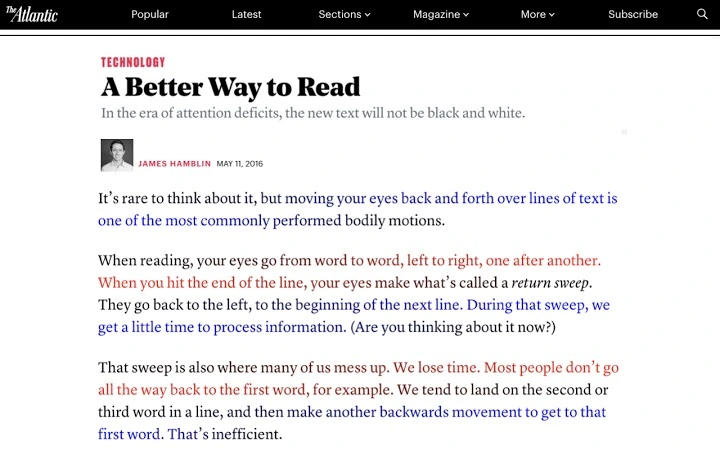
BeeLine Reader leverages a unique color gradient system to enhance reading efficiency across digital platforms. Designed to guide the eye smoothly from the end of one line to the beginning of the next, the software reduces visual fatigue and supports faster reading comprehension. This technology has been recognized by the United Nations and featured in prominent publications such as NPR and The Atlantic, affirming its credibility and impact.
Targeted primarily at students, educators, and professionals who spend significant time reading digital content, BeeLine Reader offers a practical solution for improving reading fluency. It is used in academic environments from grade school to graduate programs, and has been adopted by institutions including the California Public Library System and Bookshare.org. The tool is particularly beneficial for individuals with reading challenges, learning disabilities, or those seeking to optimize their information consumption.
Available as a browser extension, desktop application, and mobile app, BeeLine Reader integrates seamlessly into existing workflows. It functions on websites, Google Docs, Gmail, Kindle books, and text-based PDFs, enabling users to enhance readability across a wide range of platforms. The developer did not provide additional system requirements, and exact performance details were not specified.
Key Features & Capabilities
- Color Gradient Line Guidance – Uses a continuous color gradient to visually connect lines of text, reducing eye strain and minimizing the time needed to reposition between lines.
- Cross-Platform Compatibility – Works across Windows, Mac, Linux, iOS, and Android, ensuring consistent reading support regardless of device.
- Web and Document Integration – Supports reading on news websites, blogs, Google Docs, Gmail, Kindle books, and text-based PDFs through dedicated extensions.
- Free Access with Flexible Tiers – Offers a completely free version (BeeLine Social) with optional social sharing; Pro and Family Pack subscriptions available for enhanced features.
- Privacy-First Design – Does not collect, sell, or share user reading data, maintaining confidentiality and user trust.
Users can apply BeeLine Reader to long-form articles, academic papers, or digital textbooks to improve focus and retention. The color gradient reduces cognitive load during transitions between lines, making sustained reading more comfortable. Educators can deploy the tool in classrooms to support diverse learning needs, while professionals can process reports and emails more efficiently. The developer did not specify advanced customization options, but users can request new color schemes via official channels.
User Interface, Workflow & Performance
The user interface is minimal and non-intrusive, designed to enhance readability without disrupting the original content layout. The extension activates with a single click, applying the color gradient overlay directly to the text. Navigation is intuitive, requiring no complex setup or training.
Workflow efficiency is high, as the tool integrates directly into the browsing experience. Once installed, users can read enhanced content immediately without switching applications. The software operates in real-time, adjusting dynamically to page changes and scrolling behavior.
Performance observations are based on general software behavior patterns. The developer did not specify resource usage details, and exact CPU or RAM consumption was not provided. Stability appears consistent across platforms, though detailed crash reports or error logs were not made available. The software does not require background processes that could impact system performance.
Compatibility & System Requirements
BeeLine Reader is compatible with Windows, Mac, Linux, iOS, and Android operating systems. The installation size is 12.5 MB, indicating a lightweight footprint suitable for most modern devices. The software version is 1.0.0, released on July 15, 2024.
Exact system requirements were not listed. Compatibility information is limited to the supported platforms. Users should ensure their device meets standard browser requirements for extension functionality. The developer did not provide details on hardware specifications such as processor speed or memory capacity.
Pros and Cons
Pros
- Free access with no time limit for the social tier
- Proven effectiveness in improving reading speed and fluency
- Strong privacy policy with no data monetization
- Wide cross-platform availability
- Seamless integration with web content and documents
Cons
- No advanced customization options specified
- Resource usage details not disclosed
- Requires internet connection for full functionality
- Some features may require subscription for full access
- Limited technical documentation available
FAQ Section
Is BeeLine Reader free to use?
Yes, BeeLine Reader offers a completely free version called BeeLine Social, which allows unlimited usage in exchange for occasional social sharing. Additional tiers are available for users seeking enhanced features.
Which operating systems does BeeLine Reader support?
BeeLine Reader is compatible with Windows, Mac, Linux, iOS, and Android. The software is available as a browser extension, desktop application, and mobile app.
Does BeeLine Reader collect user data?
No, BeeLine Reader does not collect, sell, rent, or license user reading data. The tool is designed with privacy as a core principle, ensuring that what you read remains private.
Can I use BeeLine Reader offline?
While the core extension functions require an active internet connection, some content may be accessible offline depending on the source platform. However, real-time text enhancement is not available without connectivity.
How often does BeeLine Reader update?
Updates are released regularly to improve compatibility, performance, and feature availability. Users are encouraged to keep their extensions and apps up to date for the best experience.
Final Thoughts + CTA
BeeLine Reader stands out as a powerful, privacy-focused tool for anyone seeking to improve reading speed and comprehension. Its innovative color gradient technology has been validated by independent research and adopted by educational institutions worldwide. The free tier makes it accessible to students, educators, and casual readers alike, while subscription options offer scalable solutions for teams and families.
Whether you're reviewing academic material, processing news articles, or managing work documents, BeeLine Reader enhances focus and reduces eye strain. Its lightweight design and cross-platform support ensure a smooth experience across devices. For those looking to read more efficiently without compromising privacy, BeeLine Reader delivers a compelling solution.
Download BeeLine Reader now







